Multi-Currency Processing
Orbit supports multi-currency payment processing for businesses that sell across currencies and geographies. When a payment partner does not support the order currency, Orbit can automatically convert the amount to a supported processing currency. For card payments, Orbit can also offer dynamic currency conversion so customers choose their preferred currency at checkout.
Multi-currency processing in Orbit includes:
- Alternate currency conversion (ACC) -- converts the order amount when the payment partner path does not support the order currency.
- Dynamic currency conversion (DCC) -- offers currency options to card-paying customers based on their card country and your merchant configuration.
- Exchange rate management -- merchant-specific rates, global fallback rates, and configurable validity periods.
- Conversion rate markups -- flat or percentage markups applied per DCC currency pair for settlement coverage and revenue optimization.
Alternate Currency Conversion (ACC)
Alternate currency conversion lets you display prices in one currency while processing payments in another. This is configured per merchant for specific currency pairs and is useful when your customers see prices in a local currency that your payment partners do not process directly.
What is ACC
ACC converts the order amount from the display currency into a processing currency (typically INR) at order creation time. For example, if you sell to customers in Sri Lanka and show prices in LKR, but your payment partners only process in INR, ACC converts the LKR order amount to INR so the customer can complete payment with an international card. The payment is always processed in the converted currency, while the original order currency is retained for display and accounting purposes. This means that neither the customer nor the merchant needs to handle currency mismatches manually -- Orbit resolves them based on your configured conversion rules.
Configuration
ACC is configured per merchant through currency conversion mappings. Each mapping defines which order currency converts to which processing currency (for example, USD to INR). Orbit validates that both currencies are permitted for your account and that the processing currency has active payment partner configuration. ACC can be enabled or disabled at the sub-merchant level using the alternate_currency_allowed setting. When enabled, Orbit applies the mapping automatically during order processing. Merchants can configure multiple currency pairs to support a range of international order currencies.
Processing
When an order is created in an unsupported currency, ACC follows this flow:
- Orbit detects that the selected payment partner path does not support the order currency.
- Orbit looks up the configured currency conversion mapping for the order currency and selects the corresponding processing currency.
- The payable amount is converted using the applicable exchange rate -- merchant-specific if configured, or the global fallback rate otherwise.
- The payment is executed in the processing currency. The order retains the original currency for display and reporting.
- Settlement occurs in the processing currency.
Rates are time-bound. If a rate falls outside its validity window, Orbit uses a valid fallback rate automatically.
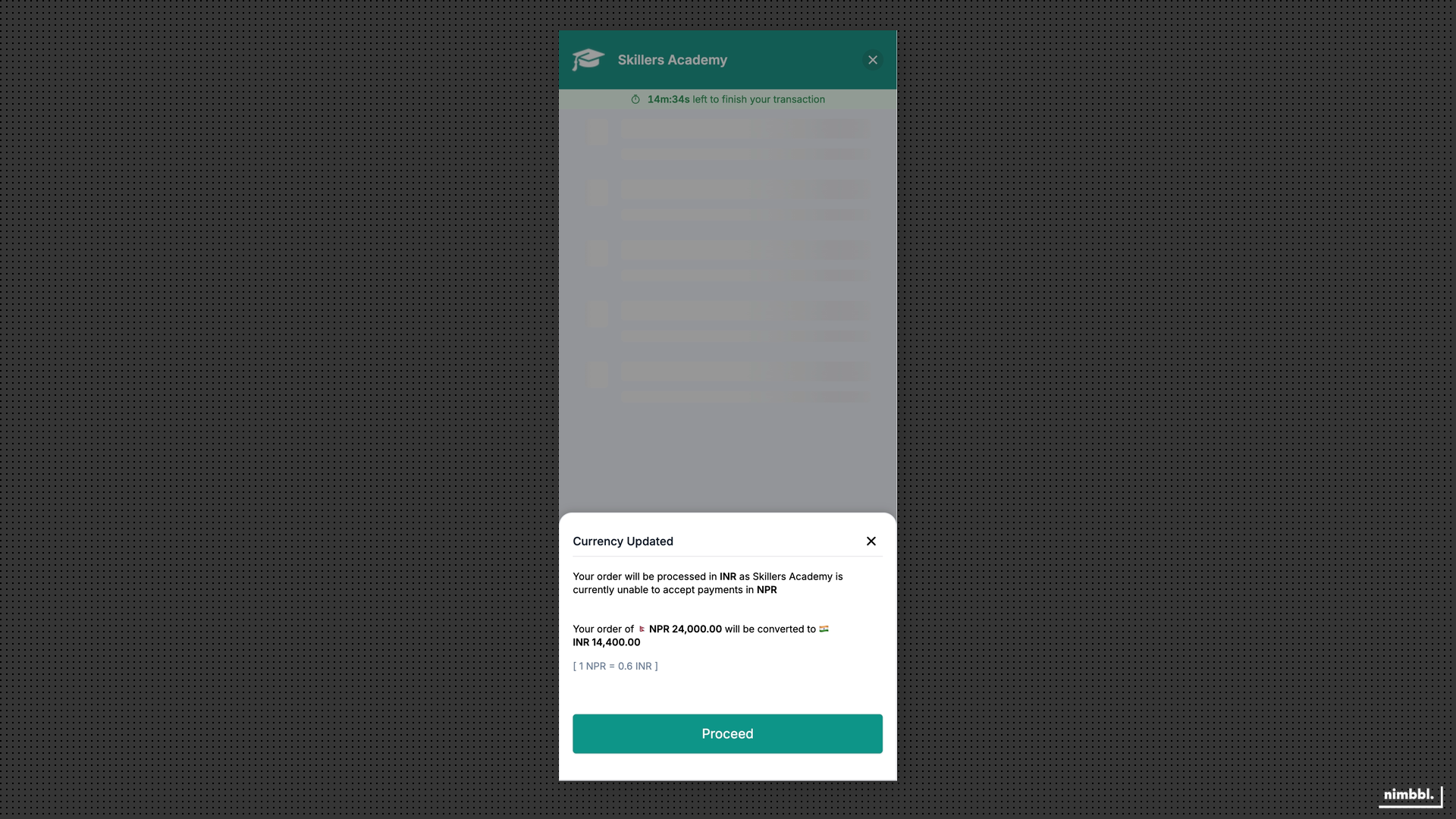 The customer sees the converted currency, exchange rate, and converted amount before proceeding with payment.
Dynamic Currency Conversion (DCC)
DCC is a card-focused capability where Orbit computes currency options based on the customer's card country and your merchant configuration. When DCC is applicable, the customer can choose to pay in their card's preferred currency or your base currency.
What is DCC
Dynamic currency conversion lets international cardholders pay in their card's home currency instead of the merchant's base currency. When a customer pays with a card issued in a country different from the order currency, Orbit calculates one or more currency options and presents them at checkout. The customer then chooses whether to pay in their own currency or the merchant's currency. The actual currency conversion is handled at the payment partner level, so the cardholder sees a familiar amount on their card statement. DCC is available only for card payments where both the card context and the merchant configuration support it.
Configuration
DCC is enabled per merchant using the dcc_enabled setting. Once enabled, merchants configure DCC charge mappings that define how markups are applied per currency pair. Charge mappings support both flat amounts and percentage-based markups. Specific currency pairs can be excluded from DCC using an exclusion list, giving merchants granular control over which conversions are offered.
Processing
When a customer enters their card details, Orbit evaluates whether DCC applies using this flow:
- Orbit determines the card's issuing country and currency from the card BIN.
- Orbit checks whether DCC is enabled for the merchant and whether the currency pair is eligible (not on the exclusion list).
- If eligible, Orbit computes one or more currency options with the payable amount for each, including any configured markup.
- The customer selects their preferred currency at checkout.
- The payment proceeds in the selected currency. The payment partner handles the underlying conversion.
- Settlement occurs in the merchant's base currency (INR).
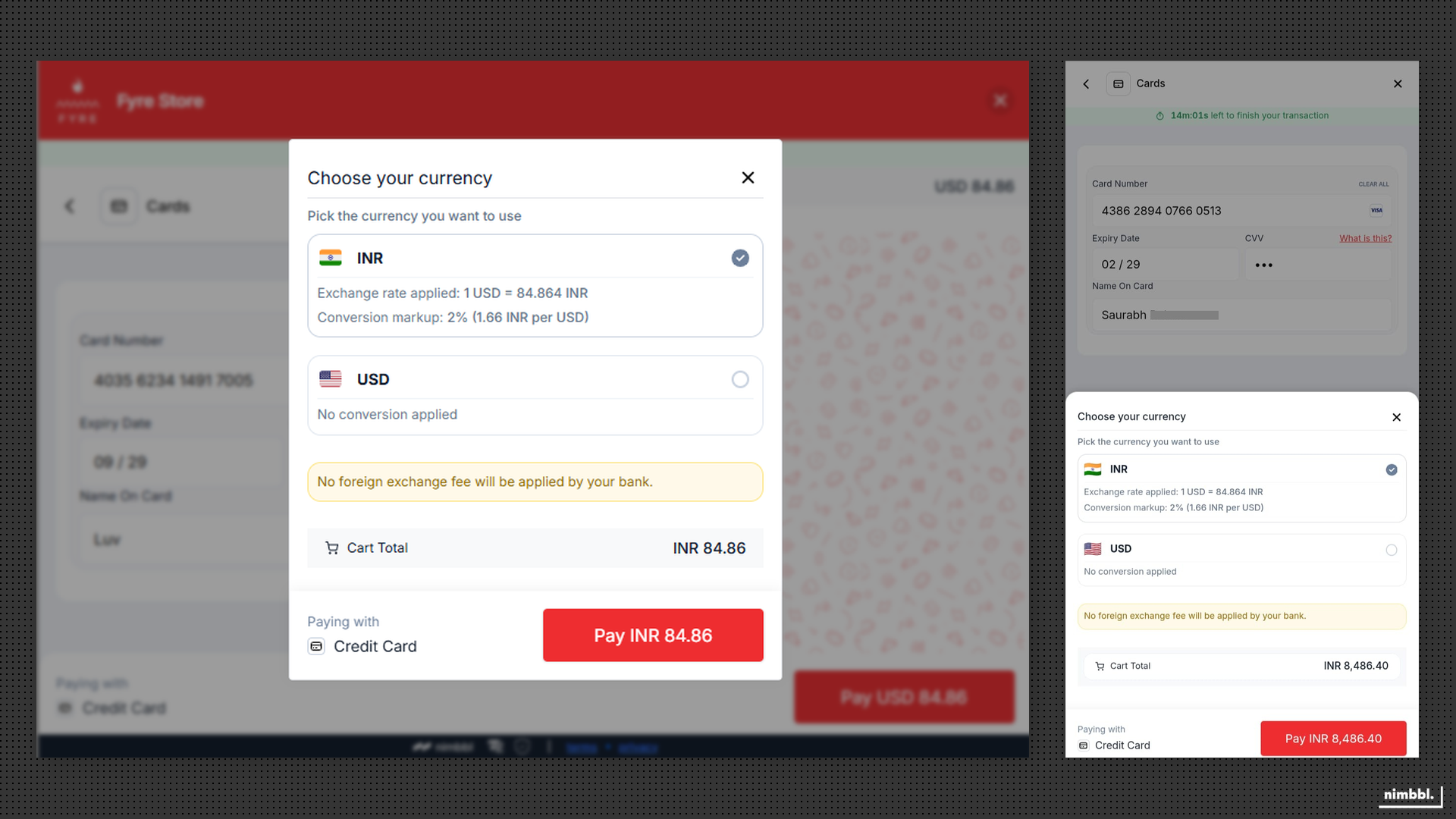 The customer sees currency options with exchange rates and selects their preferred currency before payment.
When a DCC transaction is refunded, the refund follows the exchange-rate handling rules configured for your account.
DCC is available only for card payments where both the card context and your merchant configuration support it. The customer chooses the currency at checkout.
Exchange Rate Management
Orbit's multi-currency infrastructure works across 20+ payment partners. The specific currencies available to you depend on your payment partner configuration and the currency pairs configured for your merchant account.
Global Rates
Global rates are system-wide exchange rates maintained by Nimbbl and available to all merchants. They serve as the default rates for currency conversion when a merchant does not have custom exchange rates enabled. Each global rate has a configurable validity period ranging from 1 to 30 days. When a rate falls outside its validity window, it expires automatically and Orbit uses the next valid rate. Global rates ensure that every merchant has access to working exchange rates without requiring manual configuration. They apply to both ACC and DCC conversions.
Merchant Rates
Merchant rates are optional, merchant-specific exchange rates that override global rates for your account. When the use_custom_exchange_rate setting is enabled, Orbit uses only your configured rates for all currency conversions. This gives merchants full control over the rates applied to their transactions. Merchant rates also have configurable validity periods and follow the same expiration rules as global rates. If a merchant-configured rate expires or a currency pair is not configured, Orbit does not fall back to global rates for that pair.
When custom exchange rate is disabled, global rates apply. When it is enabled, only your merchant-specific rates are used. There is no fallback to global rates for currency pairs you have not configured.
Rate Markups
Rate markups are percentage or flat-amount charges applied on top of the base exchange rate for DCC currency conversions. They allow merchants to cover conversion and settlement costs or generate additional revenue. Markups are configured per currency pair using the flat_amount_on_base_rate and base_rate_percentage settings. A markup can be a fixed amount added to the base rate, a percentage of the base rate, or a combination of both. The markup is visible to the customer as part of the converted amount shown at checkout.