Overview of the Integration
In order to complete your integration for the Standard Checkout, you will need to develop code on your server as well as on the client-side. Standard Checkout SDKs integrate Sonic checkout into your application. Nimbbl provides server side kits (PHP, .NET) and APIs and client-side SDKs to ease your development effort.
If you are looking to migrate from the old to the new Sonic checkout please check our detailed guide on what all changes you need to make.
Client and Server Interaction
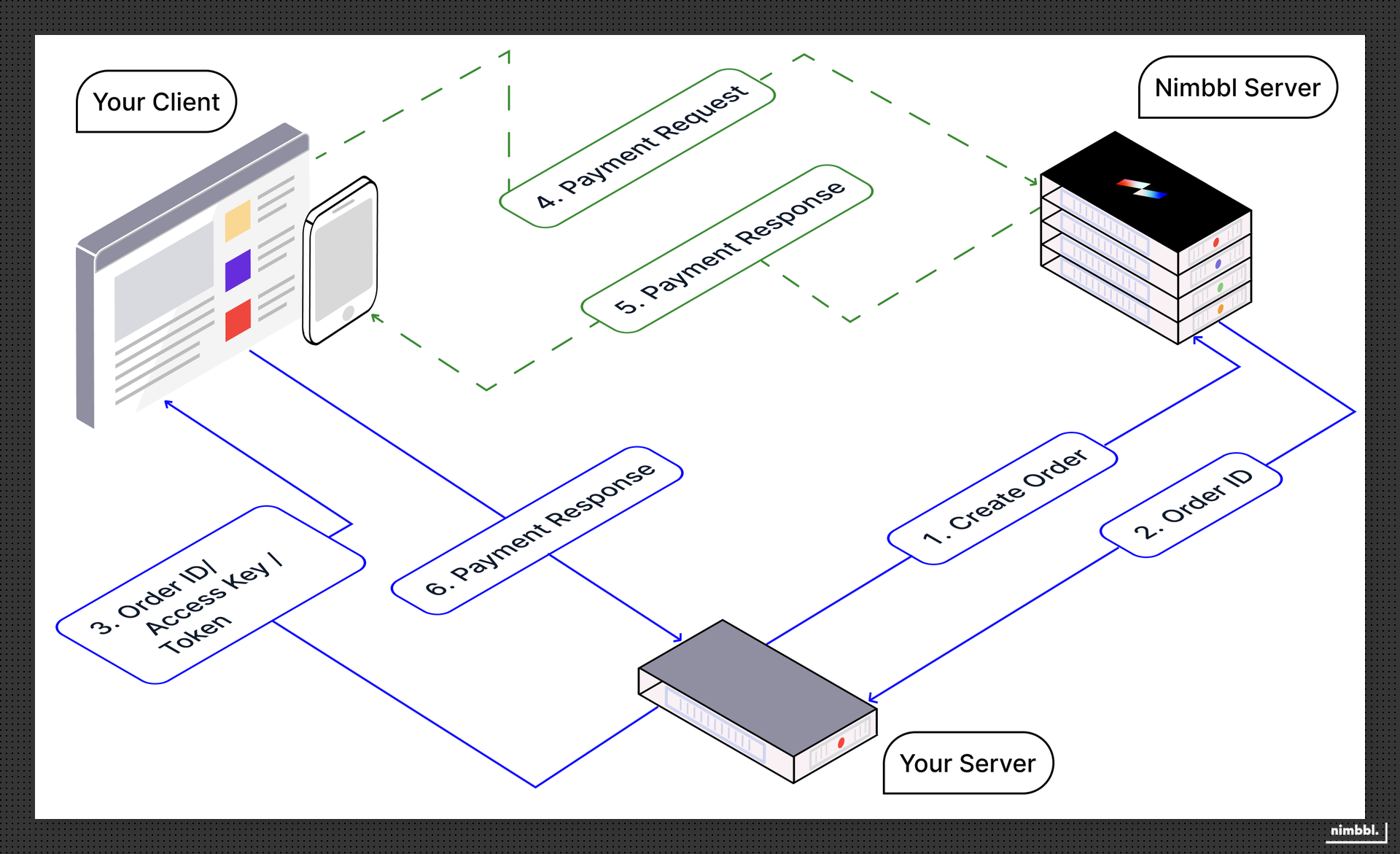
It is very important to understand the flow of the integration. There are certain steps that need to be carried out only on the server side, and these must be strictly followed to ensure that your transactions remain secure. Before starting the integration flow, you will first need to generate the merchant token, as this token will be required for all subsequent server-side API calls.
Integration Flow and Steps
- Your server makes a request with the order information to the Nimbbl server to create an order.
- Nimbbl servers will return an
order_idand atokenas a part of the response. - Pass the
order_id,access_keyandtokenfrom your server to your client, and launch the Nimbbl Standard Checkout from your client using the Nimbbl client-side SDK. This launches Sonic checkout. - Your customer can choose the desired payment mode on the Standard Checkout and the Nimbbl client-side SDK will communicate with the Nimbbl servers to initiate the payment request.
- Nimbbl Server will respond to the payment request to the Nimbbl client-side SDK. The client-SDK will provide the response to your client system. This response will contain a
nimbbl_signaturethat will need to be validated to check that the response has come from the Nimbbl server. - Pass the response (including the
nimbbl_signaturereceived) from your client to your server. You will need to validate the signature on your server using theaccess_secret.