Customer Experience
This page explains the end-to-end journey your customers follow when they receive and pay through a Payment Link. Understanding this flow helps you configure links that create a smooth payment experience.
Receiving the Payment Link
Customers receive the Payment Link through one of three channels:
- SMS -- a short message containing the payment link URL
- Email -- an email with payment details and the link URL
- Direct sharing -- you copy the link and share it through WhatsApp, social media, or any other channel
When notifications are enabled, Nimbbl sends the link immediately or at the scheduled time. When notifications are off, you share the link yourself.
Accessing the Payment Link
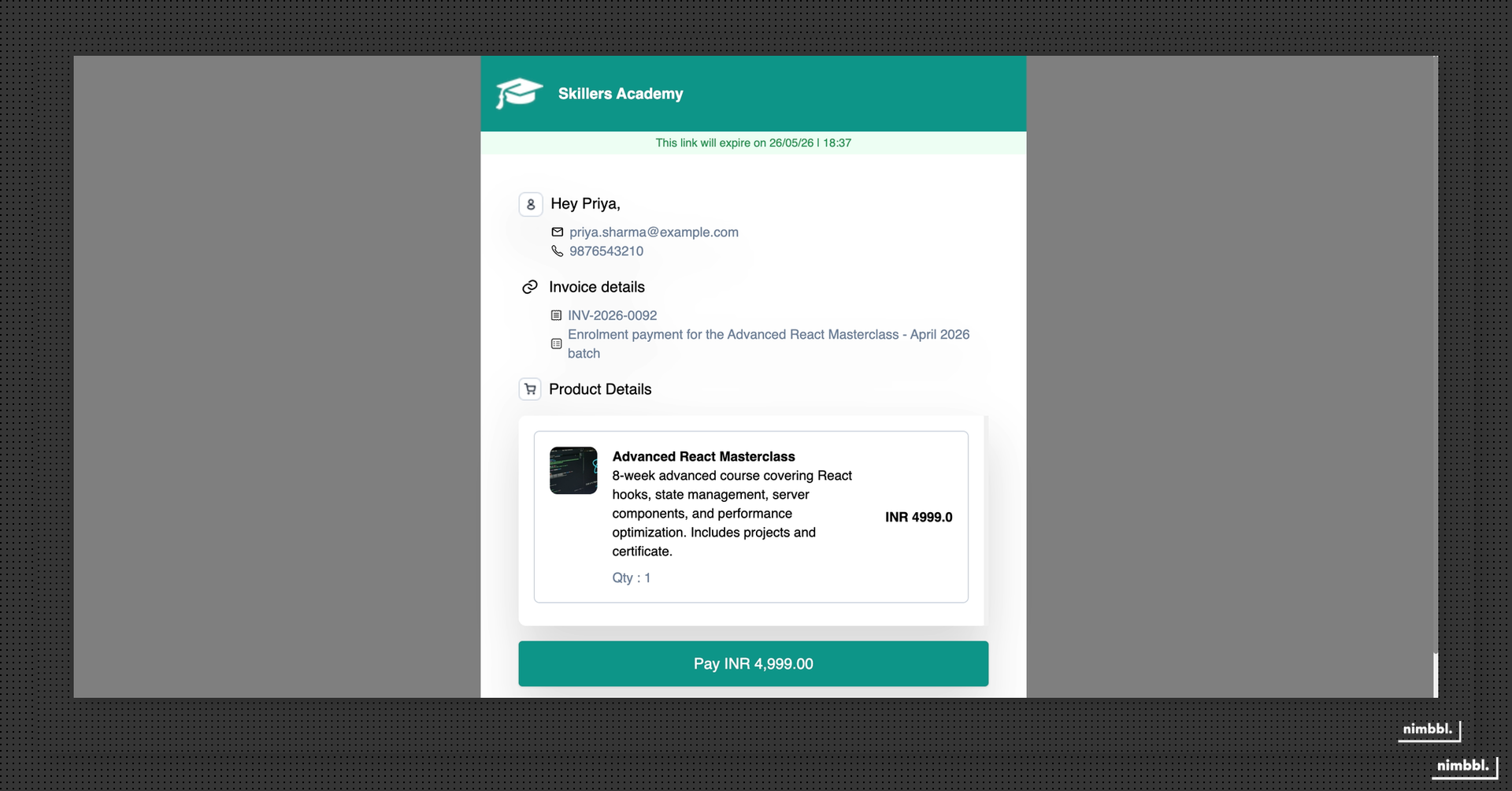
When a customer clicks the link, they land on a Nimbbl-hosted payment page. What they see depends on the link status:
- Active link -- the customer sees the payment details (amount or product list), merchant branding, and a form to enter their information before paying
- Already paid -- if the link has already been paid, the customer sees a success confirmation immediately
- Expired -- if the link has passed its expiration date, the customer sees an expiration message. Expired links cannot accept payments
For active links, the page displays the payment amount (or itemized product list for product-based links), the merchant name, and the expiration date so the customer knows how long they have to complete payment.
Completing Payment
On an active Payment Link, the customer completes these steps:
- Reviews payment details -- the customer sees the amount, product descriptions (if product-based), and merchant information
- Enters customer details -- depending on how you configured the link, the customer enters their name, mobile number, and email address
- Fills custom attributes -- if you configured TPV bank details or custom tags, the customer fills in the required fields
- Clicks Pay Now -- this creates an order and redirects the customer to Sonic checkout
Once in Sonic checkout, the customer selects their preferred payment mode -- UPI, cards, Netbanking, wallets, Pay Later, or others -- and completes the transaction. All Sonic features are available, including personalization, offers, and EMI options.
Payment Confirmation
After the payment attempt:
- Successful payment -- the customer is redirected to a success page showing order confirmation, payment ID, and payment amount. If you configured a callback URL, the customer is redirected to your website instead.
- Failed payment -- the customer sees an error message with the option to retry the payment.
The success and failure pages are hosted by Nimbbl unless you provide a custom callback URL in the Advanced tab during link creation. With a callback URL, the customer is redirected to your website with Base64-encoded payment details appended as a query parameter.