Incentivisation
Boostr incentivisation gives you the tools to create and manage offers that increase checkout conversion while keeping spend under control. You define what type of benefit to offer (discount or cashback), who should see it (targeting rules), and how much to spend (usage limits). Boostr handles the rest: evaluating eligibility in real time, applying the right offer at checkout, and enforcing limits so costs stay predictable.
This page covers what Boostr's offer engine can do at a product level. For step-by-step configuration and field-by-field setup guidance, see Command Center: Offers.
When a customer reaches checkout, Boostr evaluates which offers apply to the current order, customer, and payment mode. If multiple offers are eligible, Boostr selects one based on the configured tiebreak strategy (for example, highest value or priority order). The selected offer is displayed to the customer before payment, and the benefit is applied when the transaction completes. Usage limits are tracked in real time so an offer stops applying once its budget or cap is reached.
Offer Configuration
Offer Discovery
Customers discover offers at multiple points during checkout. Offer badges appear alongside payment modes to signal that a benefit is available. When a customer selects a payment mode, applicable offers are shown with their benefit amount and terms. Customers can also browse all available offers in a dedicated drawer to compare options before choosing how to pay.
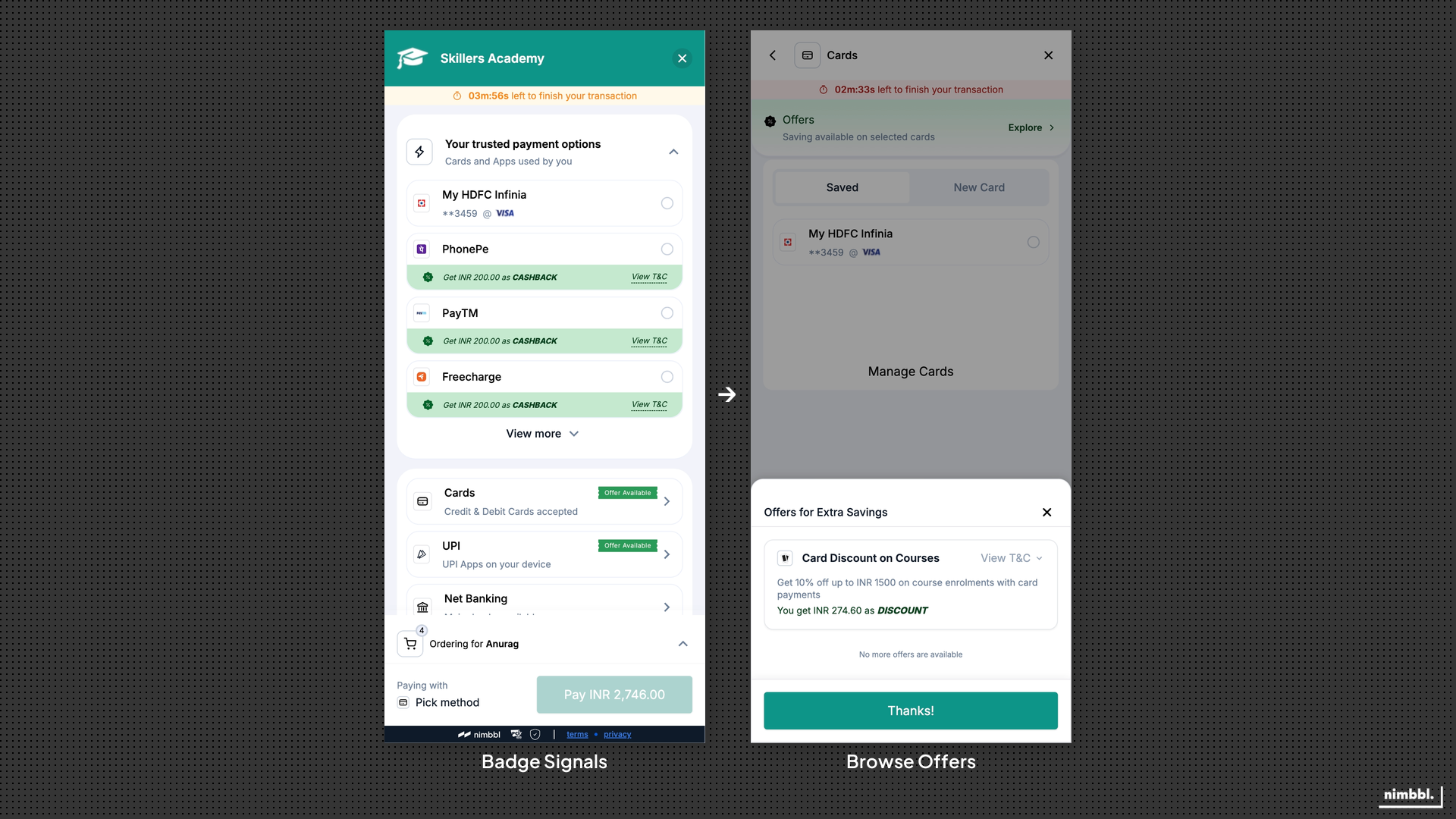 Offer badges signal available benefits alongside each payment mode, and the offer drawer lets customers browse and compare all available offers.
This layered discovery approach means customers see relevant offers without being overwhelmed. Badges draw attention; the drawer provides detail when the customer wants it.
Offer Application
When a customer selects a payment mode with an eligible offer, Boostr applies the offer and shows the updated pricing before the customer confirms payment. The customer sees the original amount, the benefit (discount or cashback), and the final payable amount so there are no surprises at the payment step.
Offers can be applied at two levels:
- Order level: the benefit is calculated on the full order total and applied uniformly.
- Line-item level: the benefit is calculated per eligible product in the order and aggregated, allowing product-specific promotions within a single checkout.
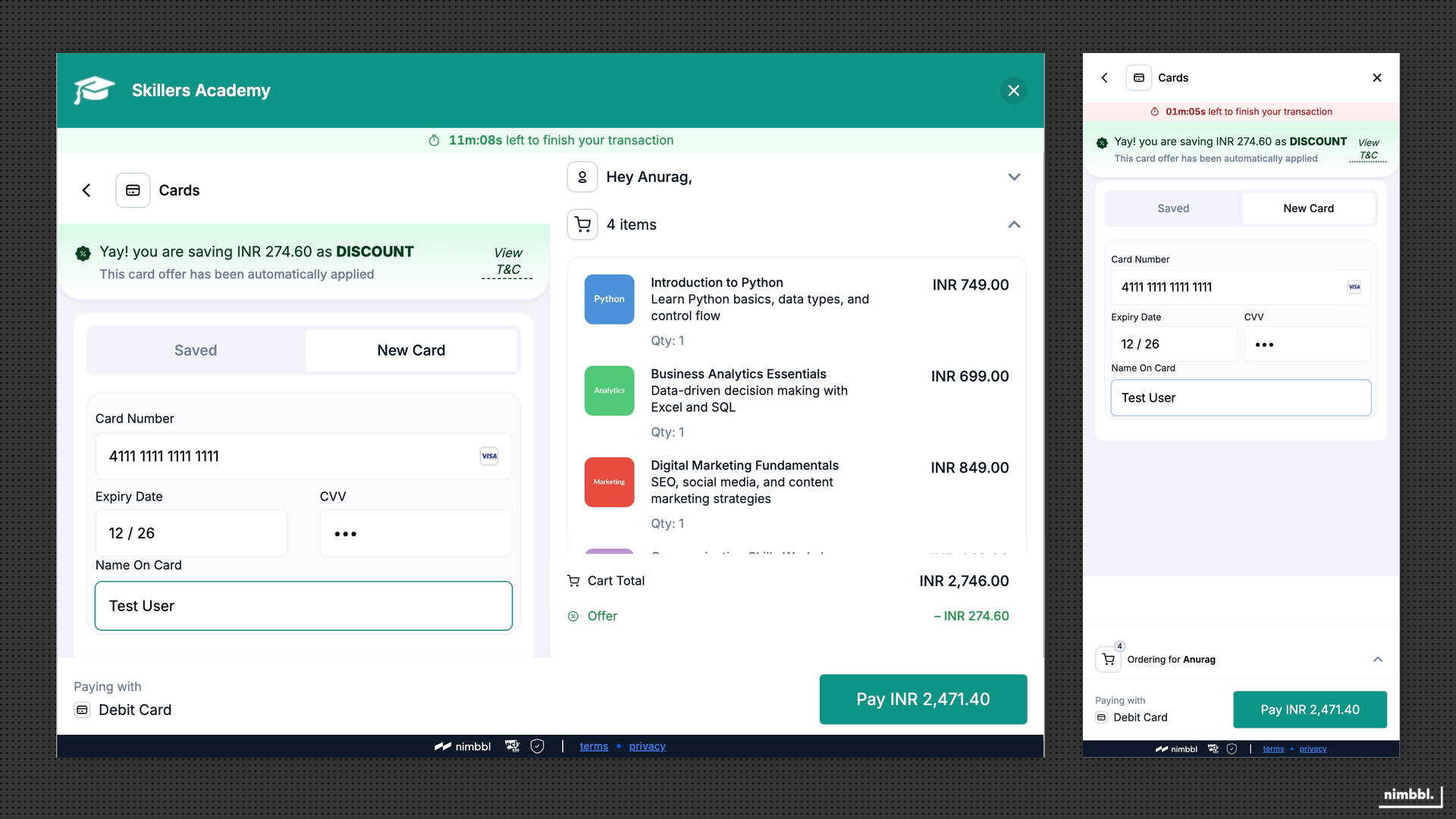 An applied offer shows the discount amount and updated total before payment.
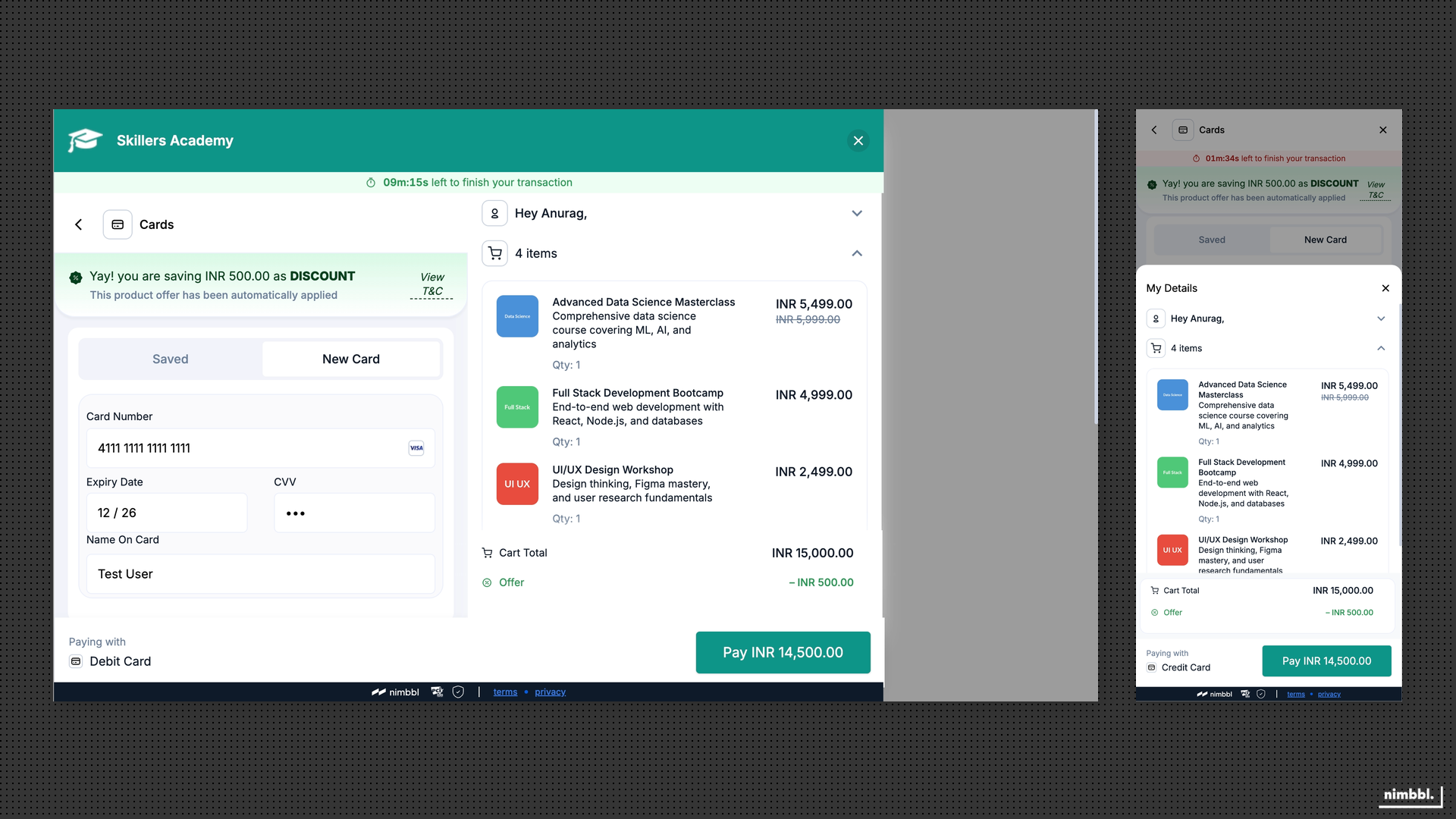 Line-item offers target individual products, showing the per-item benefit within a mixed cart.
Offer Types
Boostr supports several offer constructs to match different campaign goals:
- Percentage discount: reduces the payable amount by a percentage of the order or product value, with configurable minimum and maximum caps.
- Fixed-amount discount: reduces the payable amount by a fixed currency value.
- Percentage cashback: provides a cashback benefit as a percentage of the order value, with configurable caps. The transaction amount remains the same; the cashback is credited separately.
- Fixed-amount cashback: provides a fixed cashback amount after the transaction.
- Gamified cashback: the cashback amount is randomly selected within a configured minimum and maximum range. The structure is predictable (bounded range) while the exact benefit varies, which can increase engagement and repeat usage.
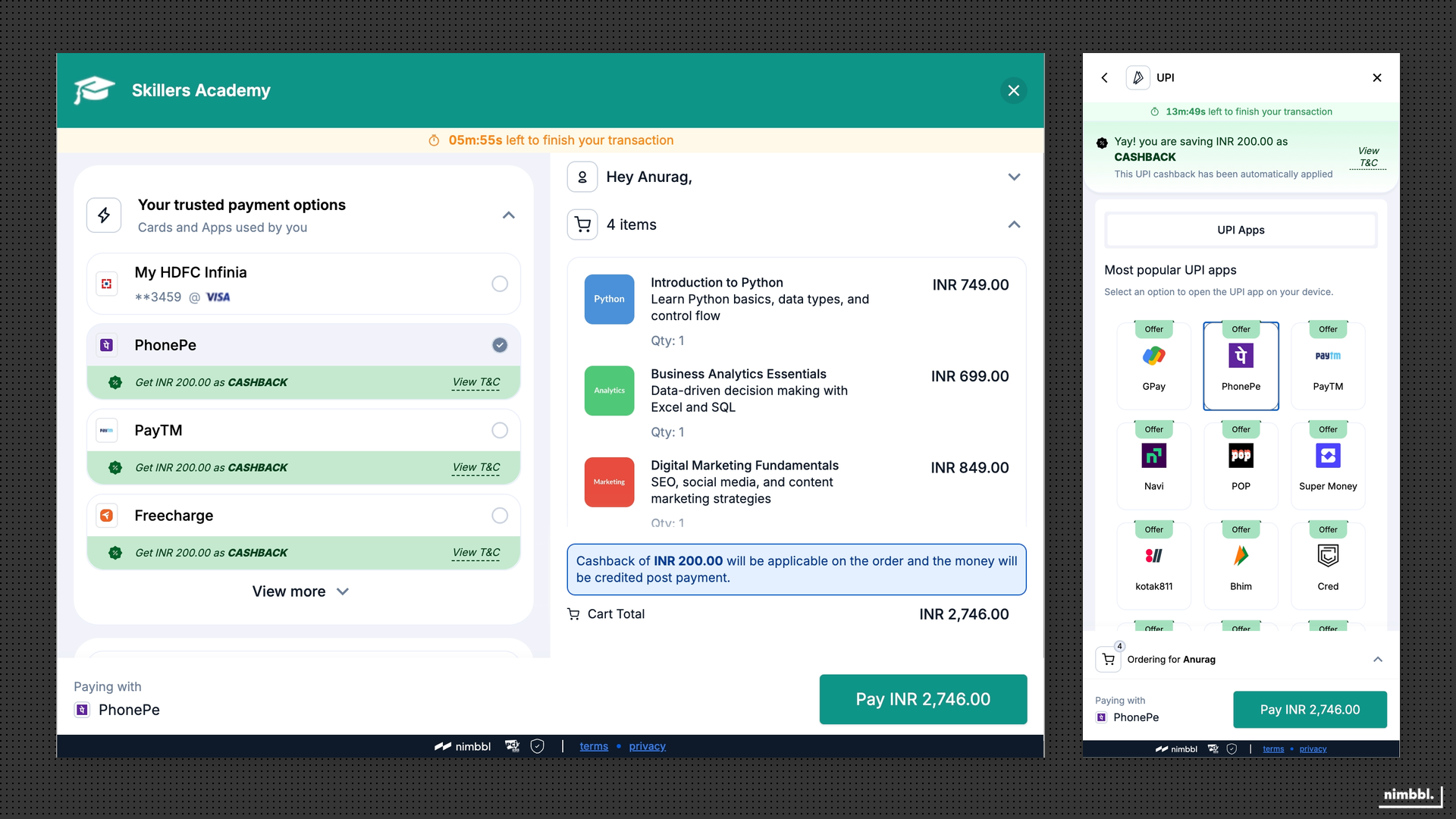 A cashback offer keeps the transaction amount intact and credits the benefit after payment.
Discounts reduce what the customer pays at checkout. Cashbacks keep the transaction amount intact and provide the benefit after payment. The choice between them depends on whether you want to reduce the upfront price or reward the customer post-purchase.
Offer Rules
Targeting rules determine which customers and orders qualify for an offer. Boostr evaluates these rules in real time so an offer is shown only when the current context matches all eligibility conditions.
Order rules set boundaries on which orders qualify. You can target by minimum or maximum order amount, quantity constraints, and cart composition. This ensures offers apply only to orders within the intended range.
Payment mode rules control which payment modes an offer applies to. For payment modes like Netbanking, wallets, and Pay Later, you can target at the provider level (for example, a specific bank for Netbanking or a specific wallet provider). For cards and UPI, Boostr supports more granular targeting:
- Card targeting: target by card type (credit, debit, prepaid), issuing bank, card scheme, and geography where configured.
- UPI targeting: target by UPI flow (intent, QR, collect), UPI app, and UPI handle where available.
Product rules let you restrict offers to specific products or categories in the order, with per-product amount and quantity constraints. This is useful for product-specific promotions where the offer should apply only to certain items in a mixed cart.
The combination of order, payment mode, and product rules means you can create highly specific offers (for example, a cashback on credit card payments above a certain amount for a specific product category) or broad offers that apply to any qualifying order.
Offer Controls & Limits
When multiple offers are eligible for the same order, Boostr selects one using the configured tiebreak strategy. The customer sees a single applied offer unless the configuration supports multiple.
Boostr includes controls that determine how offers are selected, validated, and limited:
Tiebreak strategy governs which offer wins when multiple offers are eligible. Options include highest value (the offer worth the most to the customer), lowest value, or priority-based ordering. This keeps offer selection predictable and aligned with your campaign goals.
Per-order control lets you disable offers on specific transactions even when offers are broadly enabled. This supports exceptional flows where an offer should not apply regardless of eligibility.
Validation ensures pricing consistency between what the customer saw during checkout and what is applied at payment time. If offer availability changes between checkout and payment confirmation, validation catches the discrepancy so the customer is not charged an unexpected amount.
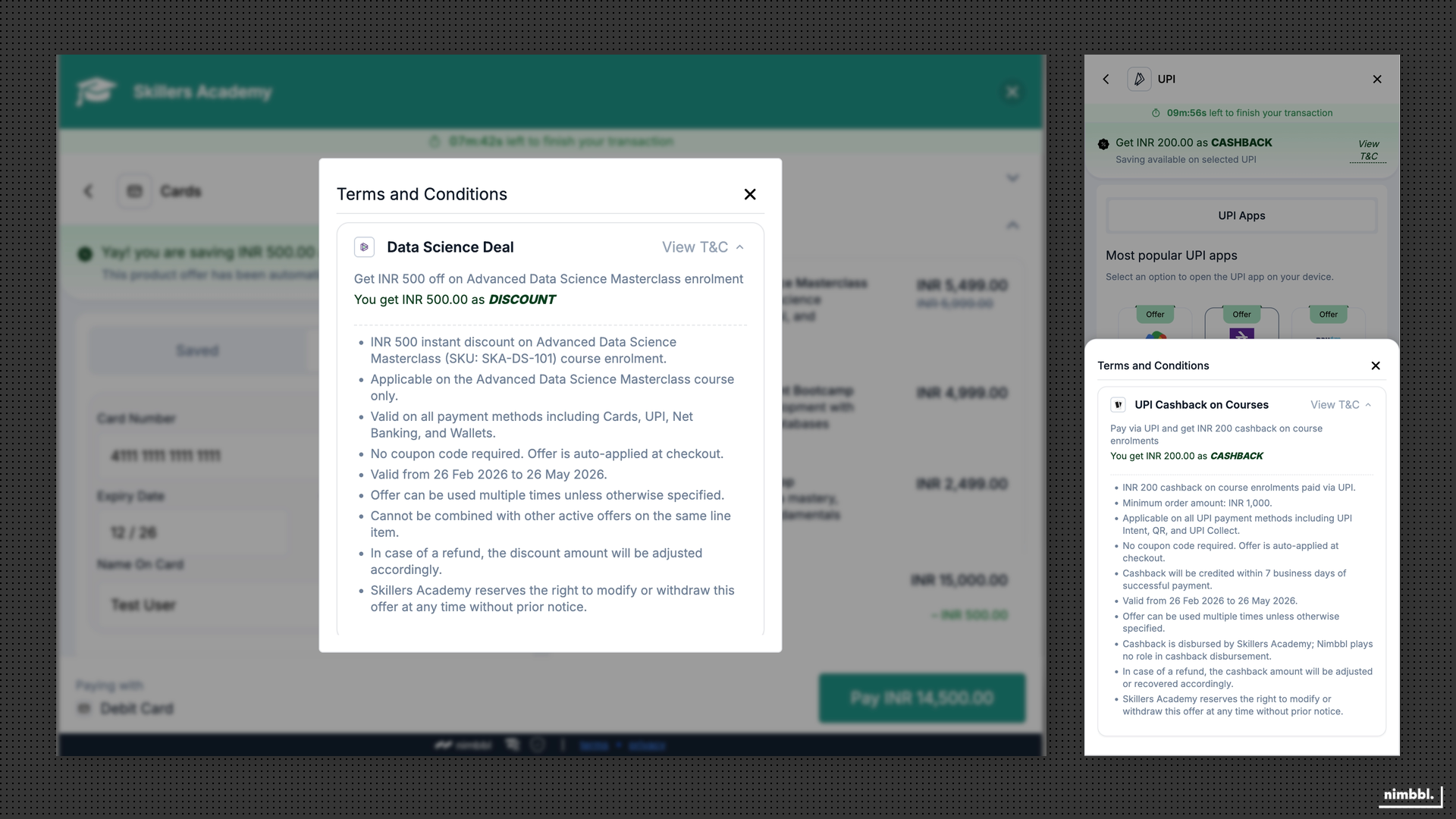 Customers can review offer terms and conditions before confirming payment.
Usage limits prevent overspend and abuse. You can set limits at multiple levels:
- Global caps: total number of times an offer can be used or total spend across all customers.
- Per-customer caps: how many times a single customer can use the offer.
- Per-card caps: how many times the offer can be applied with a specific card.
- Per-UPI caps: how many times the offer can be applied with a specific UPI ID.